
I've been acquiring, building, operating, and then selling WordPress sites since 2015. However, for my personal website, I chose EmDash.
Around the time I was launching, SHIFT64 published a brutal benchmark: WordPress was 6.4× faster than EmDash on raw server processing— 84ms vs 543ms.
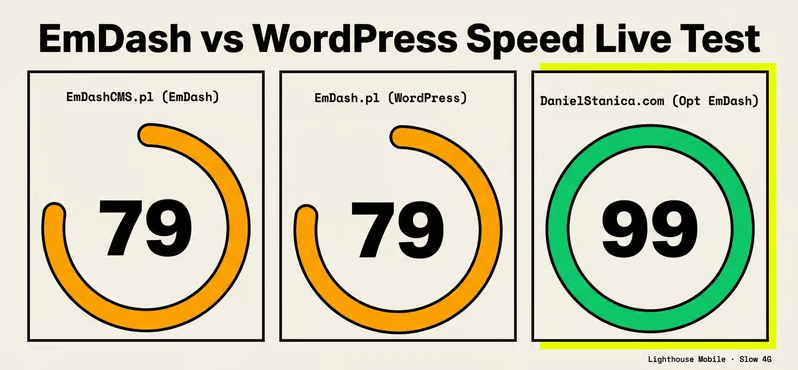
The conclusion looked decisive, but I ran PageSpeed against both showcase sites, and they scored identically. To a visitor on a phone in a coffee shop, the gap was invisible.
So I built the third data point: a tuned EmDash deployment on Cloudflare Workers, with the fixes both showcases were missing. The result is 2.5 seconds faster on LCP than the WordPress control that “won” the original benchmark, with a render-blocking budget 17× smaller.
TL;DR
- The benchmark that started this: SHIFT64 measured WordPress at 6.4× faster than EmDash on server processing. The number is real, but it’s also invisible to users, because frontend issues swamp it on both sides.
- The methodological gap: The test compared a hand-coded WordPress theme against EmDash’s default starter: tuned vs. untuned. A fair comparison needs equal effort on both sides.
- My stack: Astro 6, Cloudflare Workers, D1, R2, Cloudflare Images, EmDash v0.7.0.
- The three fixes that moved the numbers: (1) self-hosted image pipeline with AVIF + responsive srcset via custom middleware, (2) edge caching wired correctly through the Cache API, (3) self-hosted subset fonts instead of Google Fonts CDN.
- The result: Performance score in the 90–100 band, where Google rewards Core Web Vitals. LCP is 2.5s faster than the WordPress showcase. Render-blocking 17× smaller.
- Who should migrate: Almost nobody. If your WordPress is slow, fix the plugins and theme first. EmDash on Cloudflare Workers works if you are willing to do the optimization work upfront.
- What EmDash still needs: Default cache management, a built-in image pipeline, and D1 read replicas. The architecture is promising. The defaults are not yet.
The benchmark that got it half-right
Around the time I was launching my website, Mateusz Zadorozny at SHIFT64 published a brutal benchmark of EmDash vs. a hand-coded WordPress theme. The headline finding: WordPress was 6.4× faster on raw server processing: 84ms vs 543ms mean.
Even after optimization, the gap closed only to 4.1×. Cold starts on Cloudflare Workers were real, business-hour-correlated, and disproportionately punishing for Googlebot. If you run websites, I invite you to read his piece.
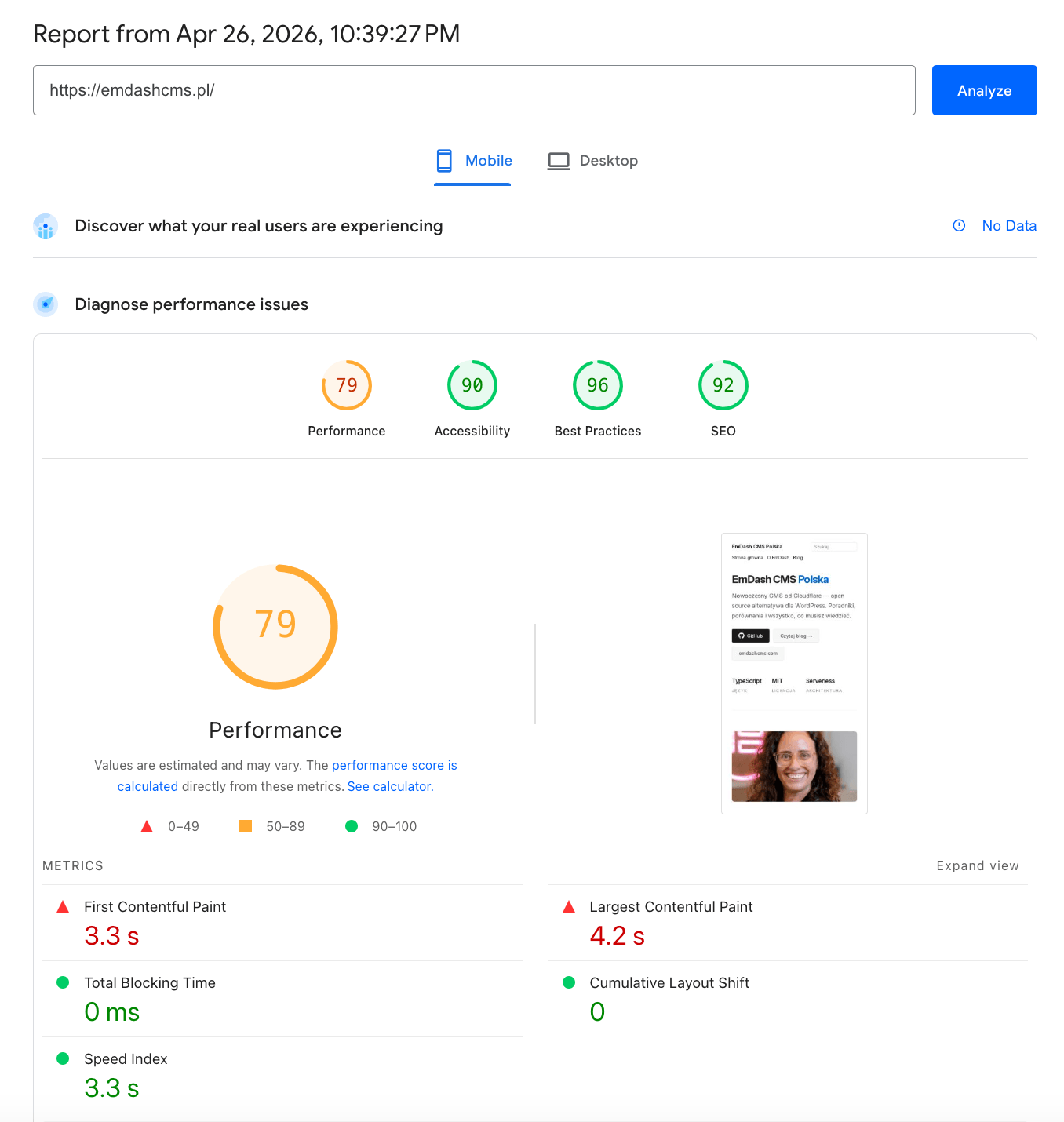
The EmDash showcase, which was a default installation and then populated with content and images hosted remotely, is emdashcms.pl (mobile, slow 4G):
- Performance 79/100
- FCP 3.3s.
- LCP 4.2s.
The LCP element is a remote Gravatar avatar served at 1536×1536, displayed at 665×665, marked loading="lazy", no fetchpriority="high". 508 KiB of unoptimized hotlinked images from Unsplash, Wikimedia, and Flickr.
The WordPress website for control, which uses a hand-coded theme and is populated with content, is emdash.pl:
- Performance 79/100
- FCP 3.3s.
- LCP 4.3s — slightly worse.
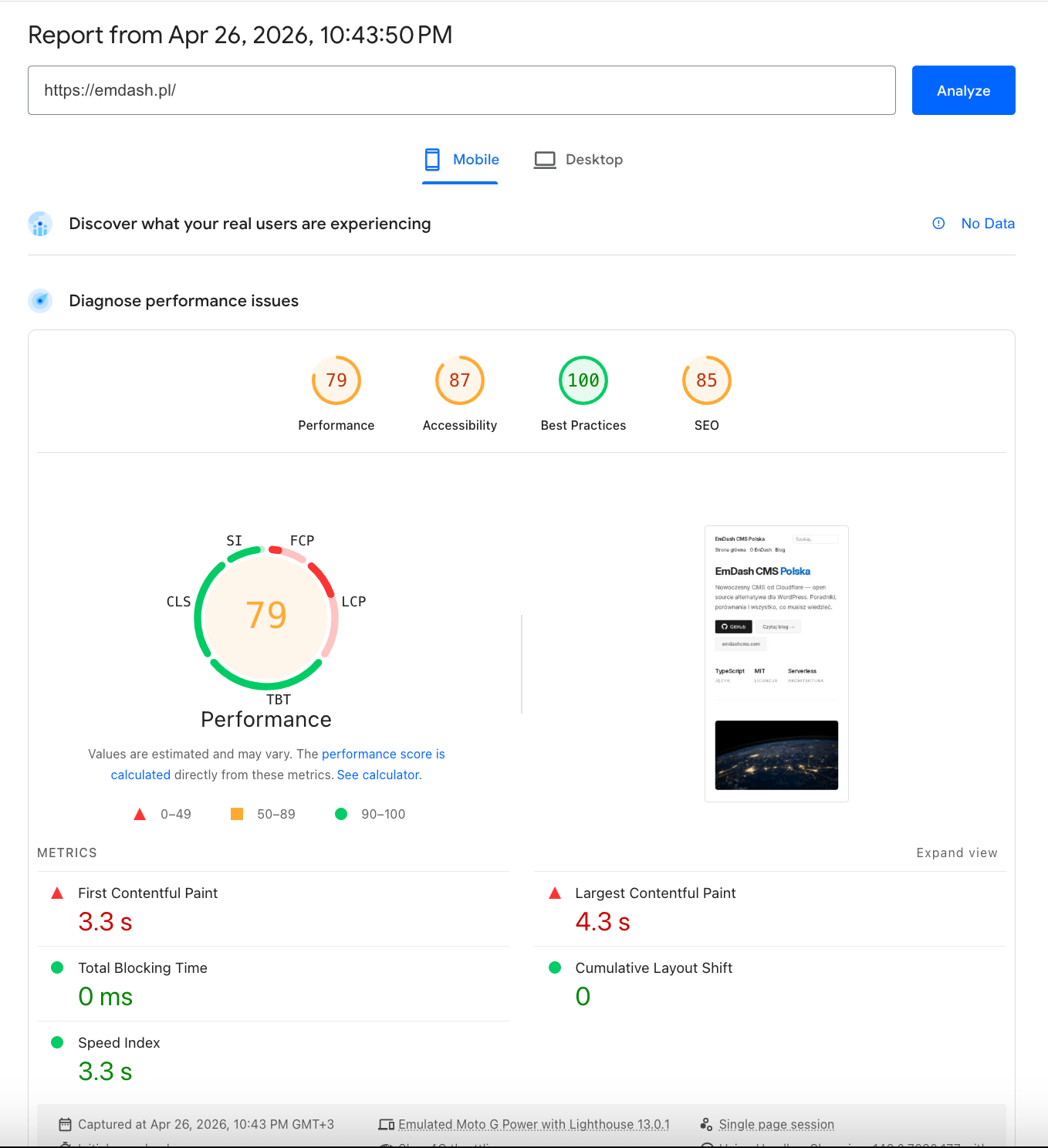
As you can see from the pictures above, the scores are identical. The WordPress site that "won" the server benchmark actually has a worse LCP and more render-blocking time than the EmDash site it was supposed to outclass.
To a visitor on a phone in a coffee shop, the two sites are indistinguishable in speed: both bad, in identical ways.
The 6.4× server-time gap that headlined the SHIFT64 piece is real, but it's also invisible at the user level because both sites bury it behind 750ms of Google Fonts blocking, render-blocking CSS, and oversized images.
Whatever the backend did or didn't do in the first hundred milliseconds, the visitor is still waiting four seconds for the largest paint on either site.
My take on the SHIFT64 experiment
The benchmark isolated a real backend difference that doesn't translate to user-perceived speed because the larger frontend problems swamp it on both sides.
Also, there's a methodological gap worth naming directly. Mateusz tested the defaults of both stacks. The WordPress side got a hand-coded theme, which is itself an optimized starting point an experienced operator would have built.
The EmDash side got the emdash blog starter template, which is what a developer ships in week one of using a new CMS. That's not an apples-to-apples comparison; that's "tuned WordPress vs. untuned EmDash."
The image choice on the EmDash side also puzzled me: remote-hosted, unoptimized stock photos that no developer would ship to production. Even if the experiment wasn't about images, it inflated the frontend gap on the side that already had less default tuning.
A fairer test, in my opinion, would have been based on the same effort applied to both sides: a hand-tuned WordPress build vs. an EmDash deployment with the Worker entrypoint properly wrapped, fonts self-hosted, images run through Cloudflare's image pipeline, and the cache layer producing actual hits. That's the deployment I'm running, and the rest of this article shows what that actually produces.
I want to say it openly: none of this invalidates his work. It just suggests the conclusion needs a footnote: a tuned EmDash deployment beats both showcases on the metrics users actually feel.
My stack and Speed Test results
DanielStanica.com runs on Astro 6 (rendering layer, zero JS by default), Cloudflare Workers (runtime), D1 (SQLite at the edge), R2 (asset storage), Cloudflare Images (responsive image pipeline), and EmDash v0.7.0 as the CMS layer on top.
Here are the results I got in Google Page Speed after enabling the improvements I’ll present in detail below.
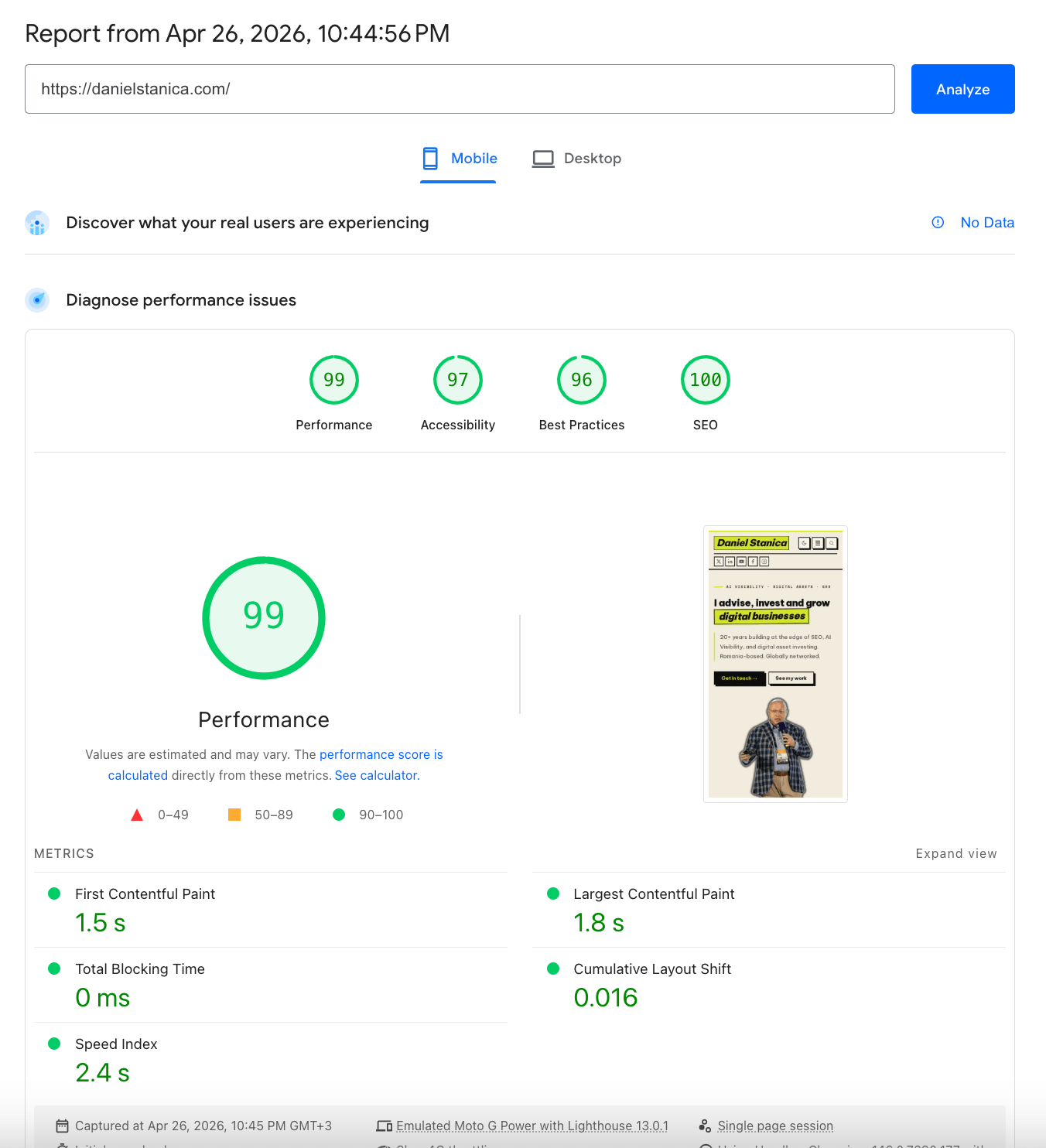
Lighthouse mobile, slow 4G throttling, emulated Moto G Power is the same configuration Google uses for Core Web Vitals reporting, and the same one SHIFT64 uses on their showcase sites:
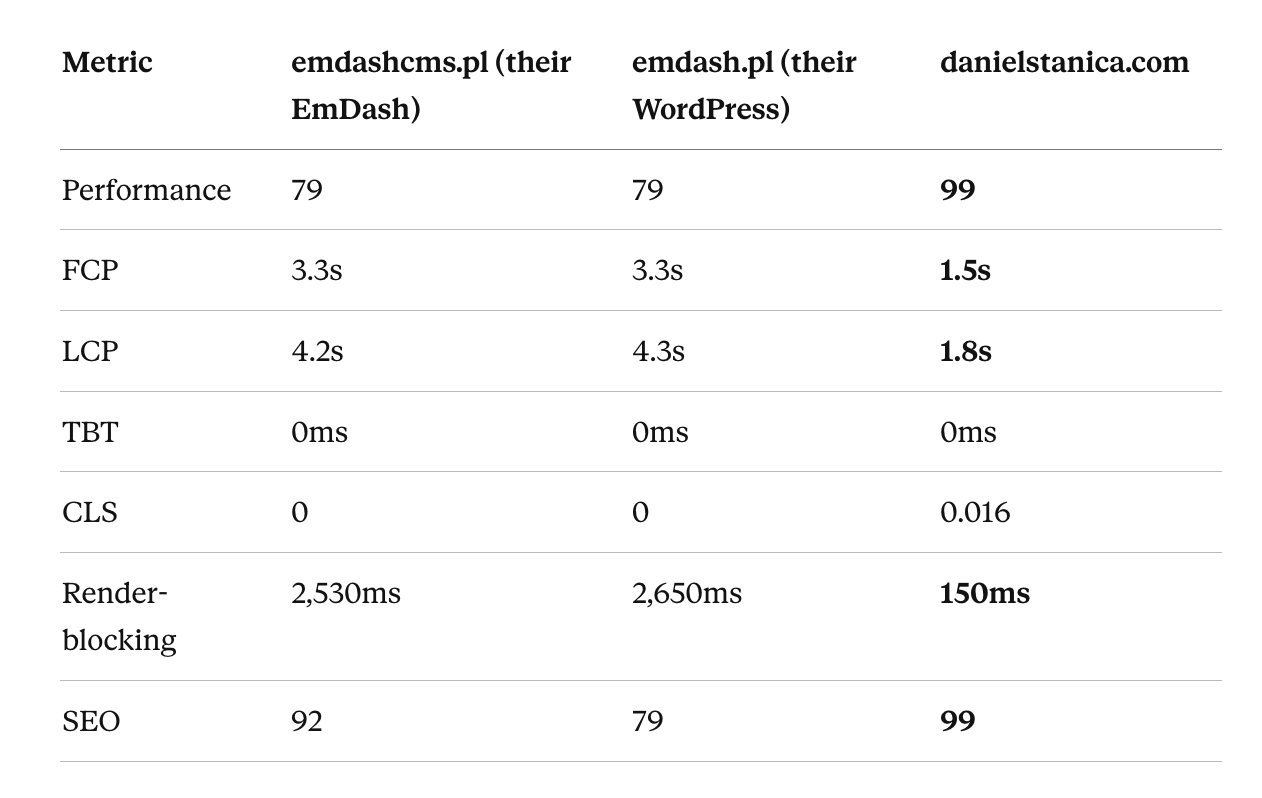
LCP is 2.5 seconds faster than the WordPress control that "won" the server-side benchmark. Render-blocking budget 17× smaller. The Performance score sits in the 90–100 band, where Google rewards Core Web Vitals; both showcase sites sit in the 50–89 band, where it doesn't.
Run PageSpeed Insights against any of the three URLs yourself.
https://emdashcms.pl/
https://emdashcms.pl/posts/miriam-schwab-emdash-sygnal-nie-nastepca

https://emdash.pl/
https://emdash.pl/przyszlosc-cms-emdash/

https://danielstanica.com
https://danielstanica.com/posts/danielstanica-personal-website-emdash-cms
What actually moved the numbers
Three things, in roughly the order I implemented them.
1. The image pipeline: self-hosted, sized, prioritized.
Every image on the site lives in R2 and is served through Cloudflare Images with AVIF-first delivery and WebP fallback. Responsive srcset at the breakpoints I actually use, not the breakpoints a plugin guesses. Explicit width and height on every <img> element to prevent layout shift. The image that participates in LCP gets fetchpriority="high" everything else loading="lazy". No remote avatar services or hotlinked stock photos.
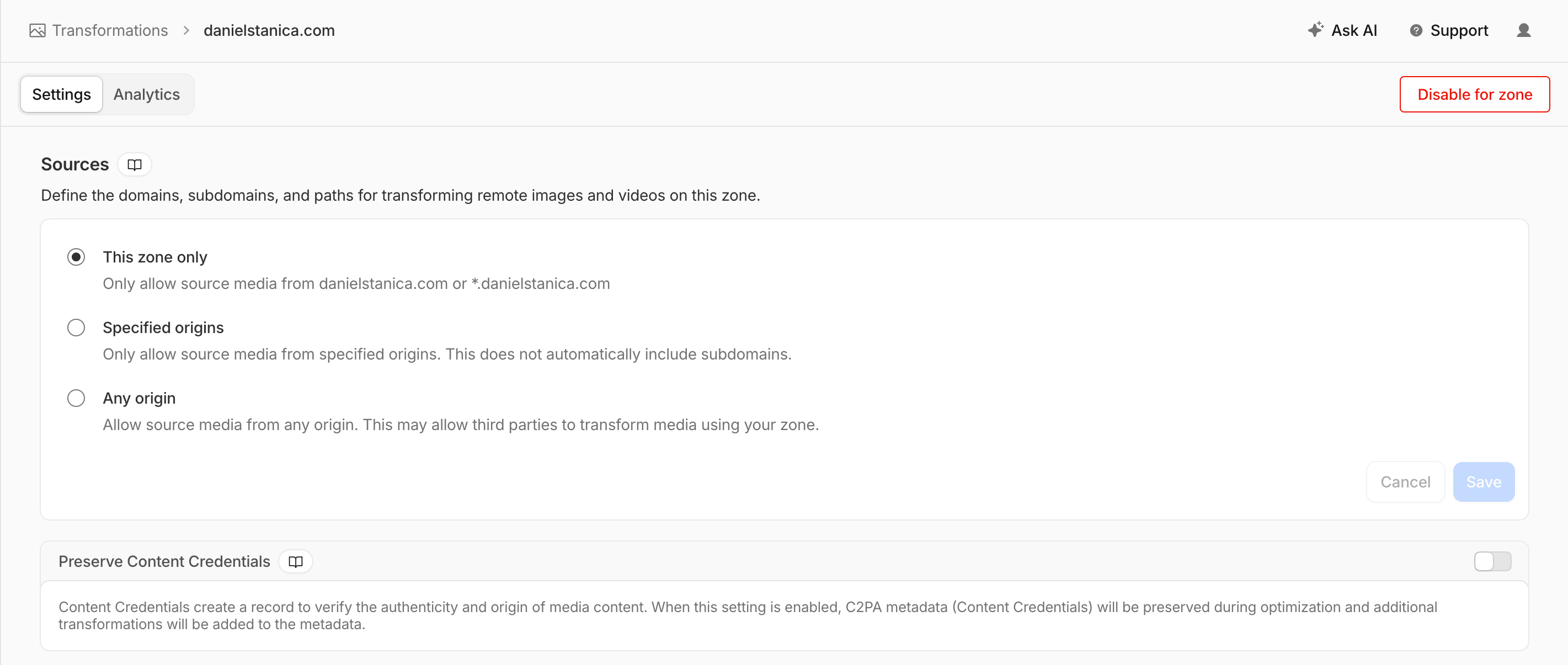
This is not a built-in feature of EmDash; I had to enable the feature in CloudFlare and write a middleware that intercepts the images and serves the responsive versions:
Middleware Source Code
import { defineMiddleware } from "astro:middleware";

const QUALITY = 82;
const VARIANTS = [400, 600, 800, 1200, 1600, 2000];
const FALLBACK_WIDTH = 1200;
const MAX_WIDTH = 2400;
const SKIP_CLASSES = ["site-logo-img", "site-favicon"];
const MEDIA_PATH = "/_emdash/api/media/file/";

const transformUrl = (src: string, width: number) =>
  `/cdn-cgi/image/format=auto,width=${width},quality=${QUALITY},fit=scale-down${src}`;

export const onRequest = defineMiddleware(async (context, next) => {
  const url = new URL(context.request.url);

  // Bypass EmDash admin and API entirely — they should see originals
  if (url.pathname.startsWith("/_emdash/")) {
    return next();
  }

  const response = await next();

  // Only rewrite HTML responses
  const contentType = response.headers.get("content-type") || "";
  if (!contentType.includes("text/html")) {
    return response;
  }

  return new HTMLRewriter()
    .on("img", {
      element(el) {
        const src = el.getAttribute("src");
        if (!src || !src.startsWith(MEDIA_PATH)) return;

        // Skip site identity images — they have their own sizing
        const className = el.getAttribute("class") || "";
        if (SKIP_CLASSES.some((c) => className.includes(c))) return;

        // Don't override an existing srcset — theme is in control
        if (el.getAttribute("srcset")) return;

        // Determine target width: 2x intrinsic for retina, capped
        const widthAttr = el.getAttribute("width");
        const parsed = widthAttr ? parseInt(widthAttr, 10) : NaN;
        const targetWidth = Number.isFinite(parsed)
          ? Math.min(parsed * 2, MAX_WIDTH)
          : FALLBACK_WIDTH;

        // Generate srcset only with variants <= target
        const variants = VARIANTS.filter((v) => v <= targetWidth);
        const srcset = variants.map((v) => `${transformUrl(src, v)} ${v}w`).join(", ");

        el.setAttribute("src", transformUrl(src, targetWidth));
        el.setAttribute("srcset", srcset);

        if (!el.getAttribute("sizes")) {
          el.setAttribute("sizes", "(max-width: 768px) 100vw, (max-width: 1280px) 50vw, 700px");
        }
      },
    })
    .transform(response);
});
In fairness, I should disclose that Claude generated this code. It works in my environment; reasonable adjustments may be needed in others.
2. Edge caching, wired correctly.
The default EmDash starter ships a cacheHint mechanism that emits cache directives into a void as there's no experimental.cache consumer wired up, so every public page request wakes the Worker, hits D1, and re-renders. The fix is to wrap the Worker entrypoint (src/worker.ts) in explicit Cache API calls. My wrapper checks caches.default.match() on every public GET, returns the cached response if there's a hit, and otherwise calls into the Astro/EmDash handler and writes the result back via cache.put() with Cache-Control: public, s-maxage=300, stale-while-revalidate=86400.
3. Font strategy that doesn't trash LCP.
I'm running Be Vietnam Pro and Space Mono, mostly heavy weights for a brutalist design. Standard loading from Google Fonts CDN would have added a 750ms render-blocking request on the critical path.
My path was to self-host via Astro's fonts: config with fontProviders.google(), subset as Latin + Latin Extended (Romanian needs the latter) display: swap, and let the browser fetch only the variants that actually render on each page. The LCP impact of the font layer alone is roughly 600ms, compared to the default Google Fonts pattern.
Smaller wins compound on top: no client-side analytics on the critical path, and a deliberate decision to ship zero JavaScript on routes that don't need it.
What's still on the list
Two things the audit flagged that I haven't fixed yet, because the article would be dishonest without them.
- Cold starts still exist. A CloudFlare worker that hasn't served a request in a few hours pays the latency penalty Mateusz documented. For my traffic profile, this matters less than it would for high-frequency content operations, but it's real. The edge cache mostly hides it from repeat visitors, but the first crawl of a fresh URL by Googlebot still eats it. A plugin or EmDash's internal functionality can, for sure, do better caching, but for this test, what I did works and proves the point.
- The score is 99, not 100%, as there are still a couple of small fixes I could make to reach it. But for the moment, I wouldn’t do it, as the cost/benefit ratio isn’t appealing to me.
What this means if you're still on WordPress
I'm not going to tell you to migrate. I run WordPress websites, I speak about WordPress at WordCamps, and I'm writing this on a non-WordPress site precisely because it’s a website with a set of needs that don't map to what WordPress is best at.
If your problem is "my WordPress is slow," the cheapest fix is almost always to uninstall 20 plugins, rewrite your theme, switch to static sites, improve your hosting, and enable better caching.
But if your problem is I don't want to maintain a WordPress site at all' and take care of patches, plugin updates, security advisories, and a hosting bill that grows every renewal, and also you're willing to do the optimization work upfront, then EmDash on Cloudflare Workers is a credible answer for a personal or advisory site.
Otherwise, I suggest you wait a couple of months or a year if the pace is maintained for a solid EmDash CMS version, as the architecture is genuinely promising. The defaults are genuinely not.
What's next
EmDash needs three things to graduate from a power-user toolkit to a default recommendation from a speed perspective:
- A Cache management functionality (so nobody has to write the one I wrote),
- An optimized image pipeline by default — R2 + Cloudflare Images with AVIF-first delivery, responsive
srcsetgeneration, and explicit dimensions baked into the media component (so no one has to remember to addfetchpriorityto their LCP image) - D1 read replicas (Cloudflare has signaled these are coming) that cut per-query latency by 5–10x.
For now, my website is fast, uses a modern stack, and has near-zero maintenance. The trade was worth it.
If you're working through a similar migration or an infrastructure/SEO challenge where benchmark methodology matters, this is what I do at Competico.



No comments yet